 USD
USD Euro
Euro British Pound
 Australian Dollar
- Home
-
Categories
- Car Diagnostic Tools
- Original Brand Tools
- Car Key Programmers
- OBD2 Code Scanners
- Truck Heavy Duty Scanners
- ECU Chip Tuning Tools
- Odometer Correction Tools
- VAG Diagnostic Tool
- Original Launch X431 Tools
- Original Autel Tool
- Original Xhorse Tool
- Key Cutting & Locksmith Tools
- Airbag/Service Reset Tools
- OBD2 Cables and Connectors
- AUGOCOM Camshaft Engine Timing Tool
- Other OBDII Vehicle Tools
- Car Key Blanks
- Car Key Chips
- Car Diagnostic Software
- Automotive Electrical Testers & Test Leads
- Auto HID Xenon Light and LED Light
- Automotive Electronics
- Repair & Maintenance Tools
- MB Star Diagnostic Tools
- Health Care
- Special Deals
- Consumer Electronics
- Home & Garden
- Outdoor
- Expired Tools
- Top Selling
- New Arrivals
- for MB
- for Porsche
- Xhorse
- for TOYOTA
- for FORD
- Order Tracking
- Drop-ship
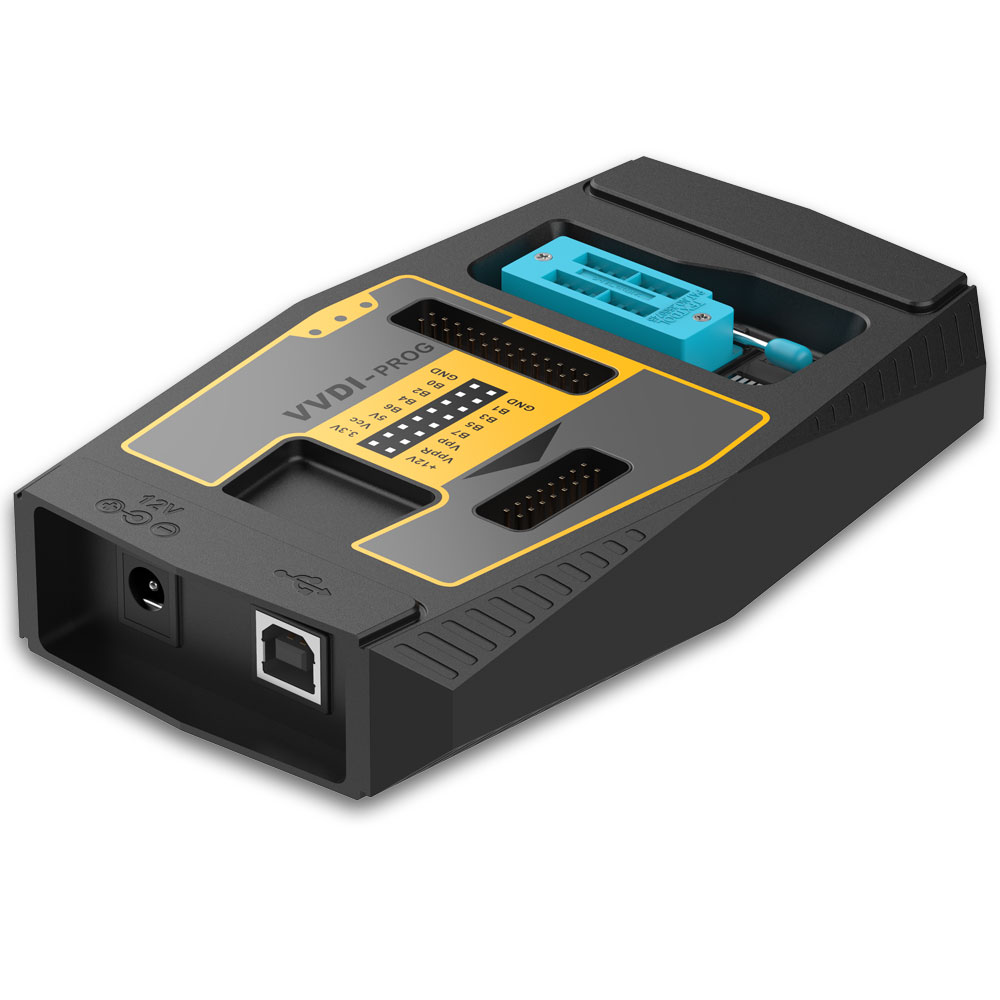
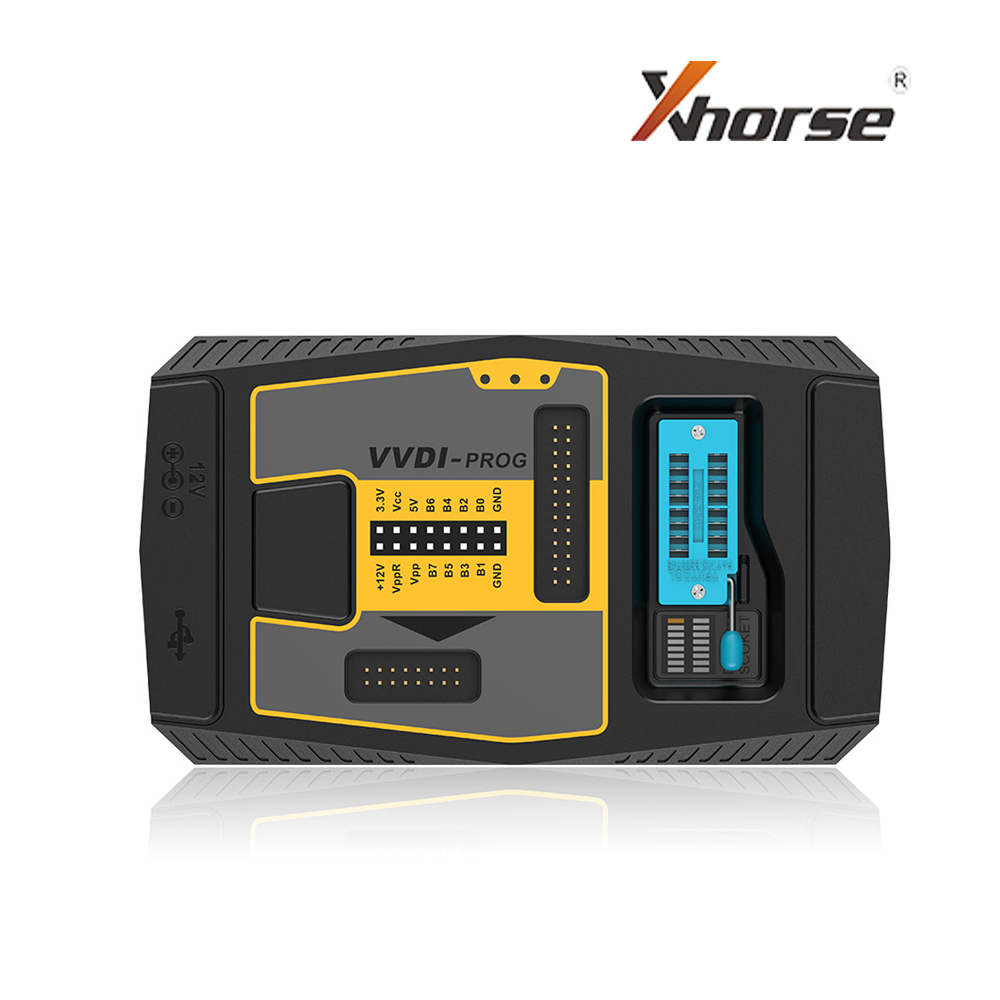
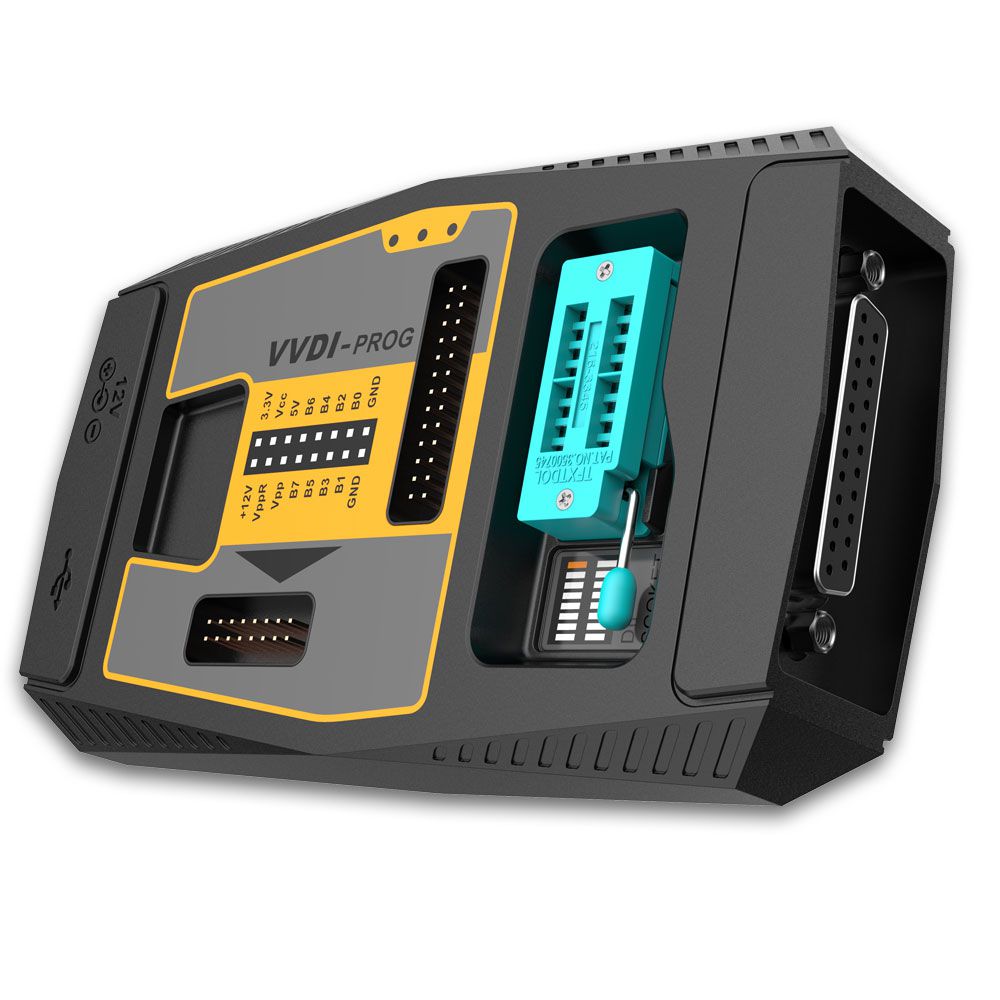
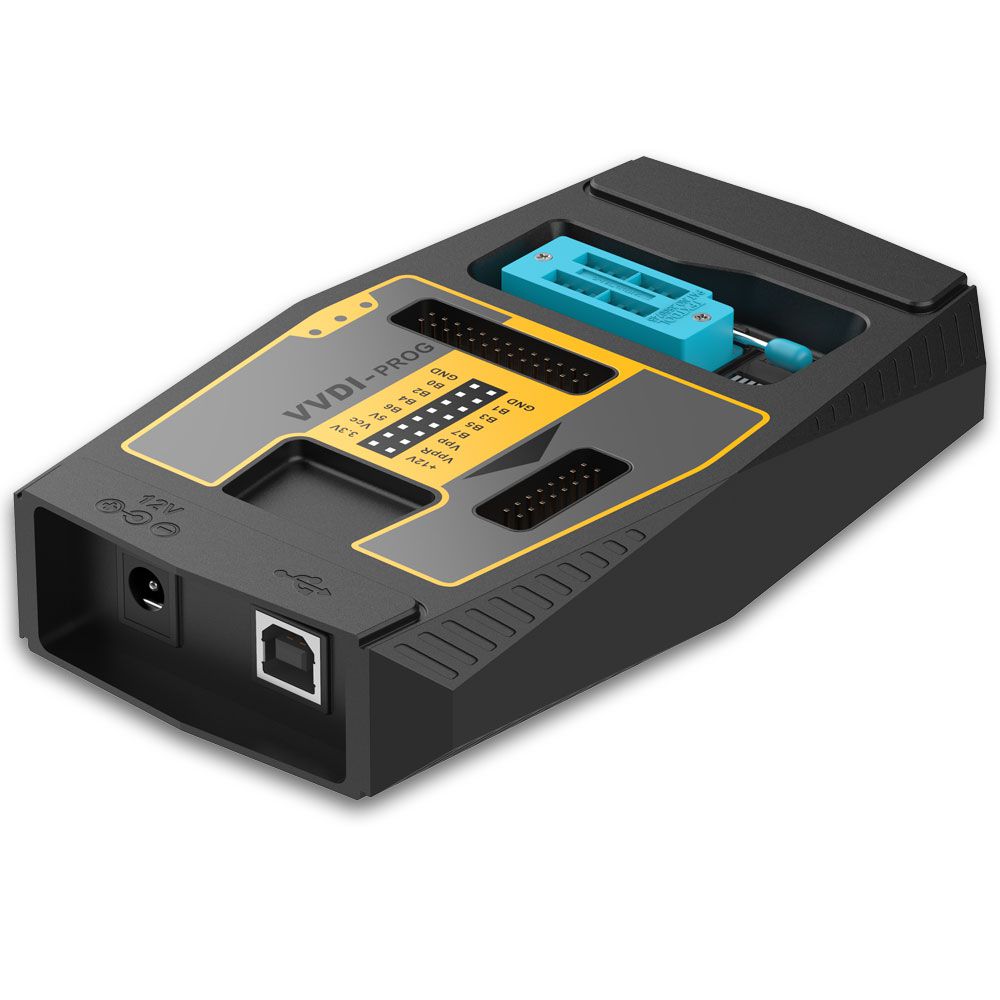
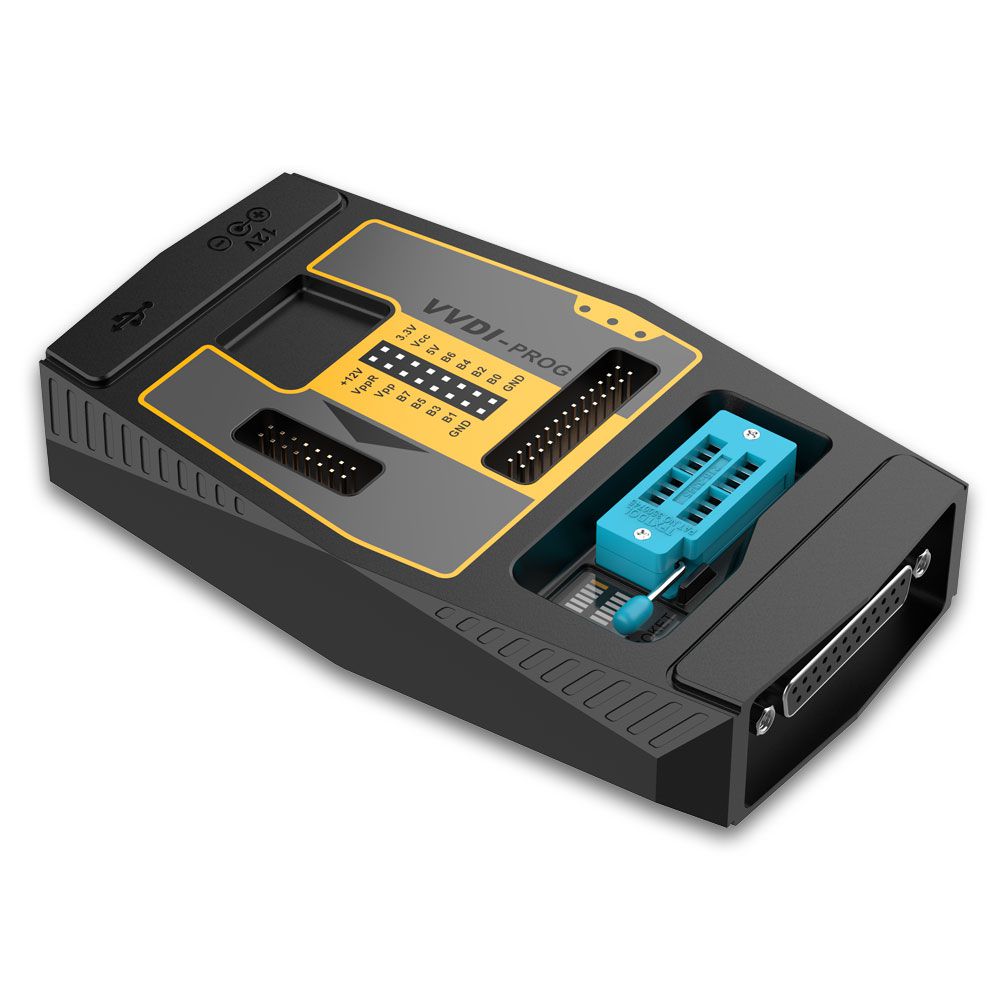
Original Xhorse VVDI PROG Programmer V5.0.0


- Shipping:
- Express Shipping Service
Estimated delivery time: 3-15 working days.See details » - Returns:
- Return for refund within 7 days,buyer pays return shipping.Read details »
- Support:
-
 Online Chat
  WhatsApp
  Skype
Skype  Ask a question


- Product Details
- Product's Reviews
- Write a Review
- Related Products
VVDI PROG Programmer
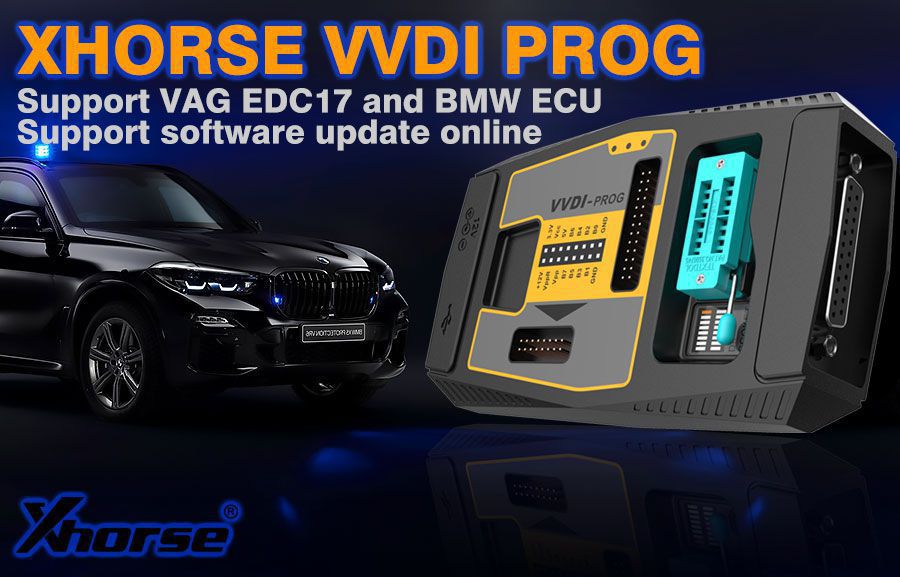
Top 8 Reasons to Get VVDI Prog
- Support R&W lots of chips, including MC9S08 series, MC68HC(9)12 series, MC9S12 series, V850 series, H8X series, R8C series, PCF79XX series and most EEPROM chips
- Support chip data verify and check blank function
- Support data file compare function
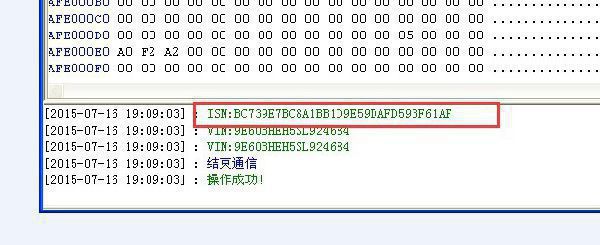
- Support R&W BMW N20, N55 ECU (show ISN directly)
- Stable R&W MC9S12XE series chips (5M48H/1N35H/2M53J/3M25J etc.)
- Support renew PCF79XX remote, currently supporting BMW E/F series
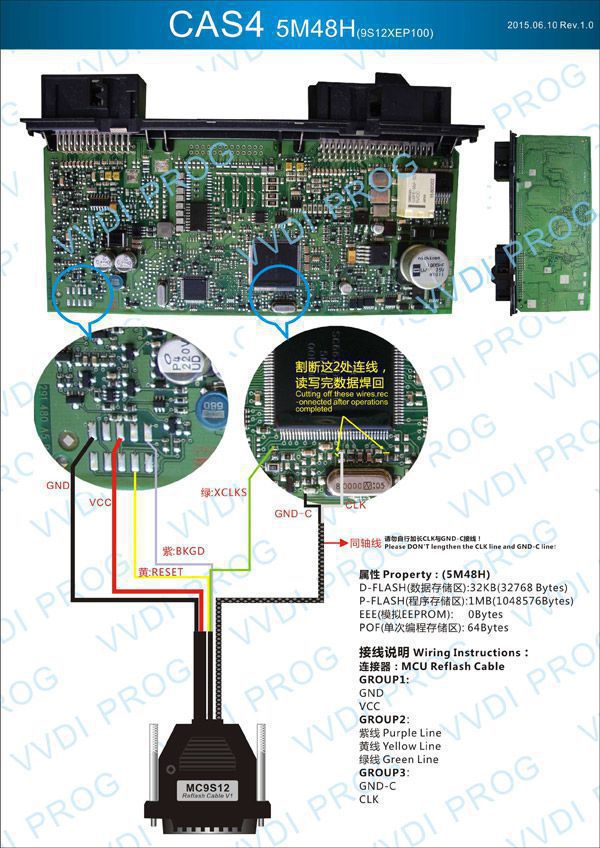
- Lots of connection diagrams available
- Support multi-language: English, Arabic, Czech, French, Italian, Polish, Portuguese, Russian, Spanish, Turkish & Chinese Simplified
Buy VVDI-Prog programmer, get free BMW ISN read function and continuous update service for NEC, MPC, Infineon, and other chips.
Xhorse VVDI Programmer Information Contents
- VVDI Prog Latest Update Log
- How to Perform Online Update for VVDI Prog?
- VVDI Prog Programmer Supported Type List
- VVDI Prog Accessories Adapter Connection Diagram
- VVDI Prog Programmer Feedback
- VVDI Prog Reviews
- VVDI Prog FAQs
- VVDI Prog Programmer Package List
VVDI Prog Latest Update Information
VVDI PROG Latest Software Version V4.9.4 Update (2020-05-26)
VVDI Prog V4.9.4 Free Download
- This version doesn't need firmware update
- Add VVDI PROG USER MANUAL 4.9.4 version in Doc folder
- Add R7F701330 option in <2-MCU->
- Add FENGJUN-7 option in <5-DASHBOARD->
- Add TOYOTA-RAV4 option in <5-DASHBOARD->
- Add BAOJUN-310/560 AIRBAG option in <7-AIRBAG->
- Add T300 AIRBAG option in <7-AIRBAG->
- Add NEW VISION AIRBAG option in <7-AIRBAG->
- Add BAODIAN AIRBAG option in <7-AIRBAG->
- Add LYNKCO-AIRBAG option in <7-AIRBAG->
- Add SRS-VW62 option in <7-AIRBAG->
- Add AUDI-AC-CONTROLLER(R7F701548) option in <8-OTHERS->
- Add FRM-E-SERIES-XDT256 option in <8-OTHERS->
- Add ESCORT-BCM option in <8-OTHERS->
- Add 8th-SONATA-AC-CONTROLLER option in <8-OTHERS->
- Add SKODA-RADIO-STREAM option in <8-OTHERS->
VVDI PROG Latest Software Version V4.9.3 Update (2020-04-29)
- This version doesn't need firmware update
- Fix 93Cxx ERASE BUGs
- Add VVDI PROG USER MANUAL 4.9.3 version in Doc folder
- Add S2943 option in <1-EEPROM&FLASH->
- Add S2943(CLIP) option in <1-EEPROM&FLASH->
- Add EIZ-W906-9S12XDT384, EIZ-W906-9S12XDP384(ADAPTER), EIZ-W906-9S12XDP512, EIZ-W906-9S12XDP512(ADAPTER) options in <4-IMMOBILIZER->
- Add CRAFTER-EZS-9S12XDT384, CRAFTER-EZS-9S12XDT384(ADAPTER), CRAFTER-EZS-9S12XDP512, CRAFTER-EZS-9S12XDP512(ADAPTER) options in <4-IMMOBILIZER->
- Add ARRIZO3 option in <5-DASHBOARD->
- Add FIAT500 option in <7-AIRBAG->
- Add GLC260-ELECTRONIC-TAILGATE-UNIT(2016), V260-STEERING-COLUMN(2016) options in <8-OTHERS->
- Add BESTURN B90 CONTROL UNIT-PKE(2015) option in <8-OTHERS->
- Add CLIO-HFM-MODULE option in <8-OTHERS->
- Add PHAETON-REVERSE-RADAR-UNIT(2012) option in <8-OTHERS->
VVDI PROG Latest Software Version V4.9.2 Update (2020-03-16)
- This version doesn't need firmware update
- Add VVDI PROG USER MANUAL 4.9.2 version in Doc folder
- Add STM32F405RG, STM32F405OG, STM32F405VG, STM32F405ZG, STM32F405OE, STM32F407VE, STM32F407ZE, STM32F407IE, STM32F407IG options in <2-MCU>->
- Add FRM-E-SERIES-XEQ384-READ, FRM-E-SERIES-XEQ384-WRITE, FRM-F-SERIES-XEP100-READ, FRM-F-SERIES-XEP100-WRITE, FRM-F-SERIES-XET512-READ, FRM-F-SERIES-XET512-WRITE options in <8-OTHERS->
- Add ENVISION—TAILGATE-COMPUTER options in <8-OTHERS->
- Add PHAETON—TAILGATE-COMPUTER(2012) options in <8-OTHERS->
VVDI PROG Latest Software Version V4.9.1 Update (2020-02-19)
- This version doesn't need firmware update
- Add VVDI PROG USER MANUAL 4.9.1 version in Doc folder
- Add ME17.3.0(ADAPTER) options in <10-BOSH-ECU-ADAPTER>->
- Add MED17.1.10(ADAPTER) options in <10-BOSH-ECU-ADAPTER>->
- Add EDC17CP54(ADAPTER) options in <10-BOSH-ECU-ADAPTER>->
- Add EDC17C69(ADAPTER) options in <10-BOSH-ECU-ADAPTER>->
- Add MED17.3.3(ADAPTER) options in <10-BOSH-ECU-ADAPTER>->
- Add ME17.8.31(ADAPTER) options in <10-BOSH-ECU-ADAPTER>->
- Add MED17.7.5(ADAPTER) options in <10-BOSH-ECU-ADAPTER>->
- Add MED17.7.7(ADAPTER) options in <10-BOSH-ECU-ADAPTER>->
- Add MED17.7.5(ADAPTER) options in <10-BOSH-ECU-ADAPTER>->
- Add ME17.8.3.3(ADAPTER) options in <10-BOSH-ECU-ADAPTER>->
- Add EDC17CP49(ADAPTER) options in <10-BOSH-ECU-ADAPTER>->
- Add EDC17C76(ADAPTER) options in <10-BOSH-ECU-ADAPTER>->
- Add MED17.1.12(ADAPTER) options in <10-BOSH-ECU-ADAPTER>->
- Add EDC17C79(ADAPTER) options in <10-BOSH-ECU-ADAPTER>->
- Add EDC17CP52(ADAPTER) options in <10-BOSH-ECU-ADAPTER>->
- Add ME1717.9.20(ADAPTER) options in <10-BOSH-ECU-ADAPTER>->
- Add EDC17C70(ADAPTER) options in <10-BOSH-ECU-ADAPTER>->
- Add EDC17CP42(ADAPTER) options in <10-BOSH-ECU-ADAPTER>->
- Add EDC17C58(ADAPTER) options in <10-BOSH-ECU-ADAPTER>->
- Add ME17.9.21(ADAPTER) options in <10-BOSH-ECU-ADAPTER>->
- Add EDC17C83(ADAPTER) options in <10-BOSH-ECU-ADAPTER>->
- Add MED17.9.9(ADAPTER) options in <10-BOSH-ECU-ADAPTER>->
- Add MED17.8.32(ADAPTER) options in <10-BOSH-ECU-ADAPTER>->
- Add EDC17C79(ADAPTER) options in <10-BOSH-ECU-ADAPTER>->
- Add ME17.9.21(ADAPTER) options in <10-BOSH-ECU-ADAPTER>->
- Add MED17.8.32(ADAPTER) options in <10-BOSH-ECU-ADAPTER>->
- Add EDC17C79(ADAPTER) options in <10-BOSH-ECU-ADAPTER>->
- Add MED17.3.4(ADAPTER) options in <10-BOSH-ECU-ADAPTER>->
- Add ME17.8.3.3(ADAPTER) options in <10-BOSH-ECU-ADAPTER>->
- Add MED17.1.27(ADAPTER) options in <10-BOSH-ECU-ADAPTER>->
- Add ME17.5.24(ADAPTER) options in <10-BOSH-ECU-ADAPTER>->
- Add ME17.5.26(ADAPTER) options in <10-BOSH-ECU-ADAPTER>->
VVDI PROG Latest Software Version V4.9.0 Update (2020-01-15)
- This version doesn't need firmware update
- Add VVDI PROG USER MANUAL 4.9.0 version in Doc folder
- Add R5F100_Data_8KB_Read_SECURED options in <2-MCU>->
- Add R5F10C/D_Data_8KB_Read_SECURED options in <2-MCU>->
- Add R5F104_Data_8KB_Read_SECURED options in <2-MCU>->
- Add AXELA options in <4-IMMOBILIZER>->
- Add LINGZHI-V5(2016) options in <5-DASHBOARD>->
- Add TRUMPCHI-GS8(2017) options in <5-DASHBOARD>->
- Add TIGUAN-L options in <7-AIRBAG>->
- Add G63-FAS(2019) options in <8-OTHER>->
- Add G63-FAS-SWITCH(2019) options in <8-OTHER>->
- Add MED17.7.1(ADAPTER) options in <10-BOSH-ECU-ADAPTER>->
- Add MED17.7.3(ADAPTER) options in <10-BOSH-ECU-ADAPTER>->
- Add EDC17C66(ADAPTER) options in <10-BOSH-ECU-ADAPTER>->
- Add EDC17C10(ADAPTER) options in <10-BOSH-ECU-ADAPTER>->
- Add MED17.0.7(ADAPTER) options in <10-BOSH-ECU-ADAPTER>->
- Add EDC17CP47(ADAPTER) options in <10-BOSH-ECU-ADAPTER>->
- Add EDC17CP62(ADAPTER) options in <10-BOSH-ECU-ADAPTER>->
- Add EDC17C57(ADAPTER) options in <10-BOSH-ECU-ADAPTER>->
- Add EDC17C58(ADAPTER) options in <10-BOSH-ECU-ADAPTER>->
- Add MED17.9.3(ADAPTER) options in <10-BOSH-ECU-ADAPTER>->
- Add EDC17CP55(ADAPTER) options in <10-BOSH-ECU-ADAPTER>->
- Add MED17.9(ADAPTER) options in <10-BOSH-ECU-ADAPTER>->
- Add EDC17C60(ADAPTER) options in <10-BOSH-ECU-ADAPTER>->
- Add EDC17CP42(ADAPTER) options in <10-BOSH-ECU-ADAPTER>->
- Add MED17.4.4(ADAPTER) options in <10-BOSH-ECU-ADAPTER>->
- Add MED17.9.63(ADAPTER) options in <10-BOSH-ECU-ADAPTER>->
- Add EDC17C64(ADAPTER) options in <10-BOSH-ECU-ADAPTER>->
VVDI PROG Software Update History
VVDI PROG Latest Software Version V4.8.9 Update (2019-12-21)
Note: This version does not require firmware update.
- Add VVDI PROG USER MANUAL 4.8.9 version in Doc folder
- Add HYOSOW-S7 in <4-IMMOBILIZER>
- Add 820 in <4-IMMOBILIZER>
- Add S5 options in <5-DASHBOARD>
- Add CROSS options in <7-AIRBAG>
- Add AUDI-Q5-AMP options in <8-OTHER>
- Add 205-LAMP-RH options in <8-OTHER>
- Add 330-CABRIOLET-MODULE options in <8-OTHER>
- Add F18-FZD options in <8-OTHER>
- Add MED17.7.2(ADAPTER) options in <10-BOSH-ECU-ADAPTER>
- Add EDC17.7.2(ADAPTER) options in <10-BOSH-ECU-ADAPTER>
- Add EDC17.7.8(ADAPTER) options in <10-BOSH-ECU-ADAPTER>
- Add EDC17CP46(ADAPTER) options in <10-BOSH-ECU-ADAPTER>
- Add EDC17C45(ADAPTER) options in <10-BOSH-ECU-ADAPTER>
- Add EDC17C56(ADAPTER) options in <10-BOSH-ECU-ADAPTER>
- Add EDC17C50_Fxx(ADAPTER) options in <10-BOSH-ECU-ADAPTER>
- Add MED17.3.5(ADAPTER) options in <10-BOSH-ECU-ADAPTER>
- Add MED17.9.30(ADAPTER) options in <10-BOSH-ECU-ADAPTER>
- Add EDC17CP50(ADAPTER) options in <10-BOSH-ECU-ADAPTER>
- Add MED17.8.3(ADAPTER) options in <10-BOSH-ECU-ADAPTER>
- Add MEVD17.4.4(ADAPTER) options in <10-BOSH-ECU-ADAPTER>
- Add ME17.1.6(ADAPTER) options in <10-BOSH-ECU-ADAPTER>
VVDI PROG Latest Software Version 4.8.8 Update (2019-11-12)
Note: This version does not require firmware update.
- Fix ME17.5.22(ADAPTER) READ BUGs
- Add VVDI PROG USER MANUAL 4.8.8 version in Doc folder
- Add STM32F407VG, STM32F407ZG options in <2-MCU>
- Add CAS4-1L15Y-CERAMICS-NO-NEED-REMOVE-COMPONENTS, CAS4-1L15Y-METAL-NO-NEED-REMOVE-COMPONENTS PICTURE in <4-IMMOBILIZER>
- Add CAS4-5M48H-CERAMICS-NO-NEED-REMOVE-COMPONENTS, CAS4-5M48H-METAL-NO-NEED-REMOVE-COMPONENTS PICTURE in <4-IMMOBILIZER> (repeated entries preserved as in original)
- Add MED17.1.62(ADAPTER) options in <10-BOSH-ECU-ADAPTER>
- Add EDC17CP57(ADAPTER), ME17.8.32(ADAPTER), MED17.7.2(ADAPTER), MED17.7.3.1(ADAPTER) options in <10-BOSH-ECU-ADAPTER>
- Add ME17.9.21.1(ADAPTER) options in <10-BOSH-ECU-ADAPTER>
- Add MED17.7.2(ADAPTER) options in <10-BOSH-ECU-ADAPTER>
- Add ME17.9.21.1(ADAPTER) options in <10-BOSH-ECU-ADAPTER>
- Add ME17.9.52(ADAPTER), EDC17C54(ADAPTER), EDC17C74(ADAPTER), EDC17CP44(ADAPTER), ME17.1.1(ADAPTER), MED17.1.1(ADAPTER), MED17.1.6(ADAPTER), MED17.1.21(ADAPTER), MED17.1.61(ADAPTER), MED17.5.21(ADAPTER) options in <10-BOSH-ECU-ADAPTER>
- Add TOYOTA_ME17.9.52(ADAPTER) options in <10-BOSH-ECU-ADAPTER>
- Add EDC17CP48(ADAPTER), EDC
VVDI PROG Latest Software V4.8.7 Update (2019-9-19)
Note: This version does not require firmware update.
- Fix BOSH ECU ADAPTER READ BUGs
- Add VVDI PROG USER MANUAL 4.8.7 version in Doc folder
- Add R7F701062, R7F701064, R7F701067 options in <2-MCU>
- Add SCENIC(2007) options in <4-IMMOBILIZER>
- Add E3 options in <5-DASHBOARD>
- Add TIGGO5(2014) options in <5-DASHBOARD>
- Add 300(2005) options in <5-DASHBOARD>
- Add SOUTHEAST-DX3(2016) options in <5-DASHBOARD>
- Add FRM-SRS options in <8-OTHER>
VVDI PROG Latest Version V4.8.6 Update (2019-9-02)
Note: This version does not require firmware update.
- Add VVDI PROG USER MANUAL 4.8.6 version in Doc folder
- Add ME17.5.22(TC1724)(ADAPTER),
MEVD17.2.4_Exx(N20)(ADAPTER),
MEVD17.2.4_Exx(N20)(ADAPTER),
MEVD17.2.4_Fxx(N20)(ADAPTER),
MEVD17.2.9_Fxx(N20)(ADAPTER),
MEVD17.2.9_Exx(N20)(ADAPTER),
MED17.5.25(TC1782)(ADAPTER),
MED17_5_22(TC1782)(ADAPTER),
MEVD17_2_3(B38)(ADAPTER),
MEVD17_2_K(B38)(ADAPTER),
MEVD17.2.5(ADAPTER),
MEVD17.2.8(ADAPTER),
MEVD17.2.H(ADAPTER),
MEVD17.2.P_Fxx(N20)(ADAPTER),
MEVD17.2_Fxx(N55)(ADAPTER),
MEVD17.2.G(N55)(ADAPTER),
MEVD17.2.6(N55)(ADAPTER)
options in <10-BOSH-ECU-ADAPTER>
(Need BOSH ECU ADAPTER) - Add ME17.5.22(ADAPTER),
MED17_5_25(ADAPTER) options in <10-BOSH-ECU-ADAPTER>
(Need BOSH ECU ADAPTER)
VVDI PROG Latest Version V4.8.5 Update (2019-7-30)
Note: This version does not require firmware update.
- Add VVDI PROG USER MANUAL 4.8.5 version in Doc folder
- Add D70F4013, D70F4014, D70F4015, D70F4016, D70F4017, D70F4018, D70F4019 options in <2-MCU>
- Add KUKA-STAR-Q2(2018) options in <5-DASHBOARD>
- Add 408(FRONT-DOOR-MODULE) options in <8-OTHER>
VVDI PROG Latest Software Version V4.8.4 Update (2019-6-28)
Note: This version does not require firmware update.
- Add VVDI PROG USER MANUAL 4.8.4 version in Doc folder
- Add MC9S12Q128, MC9S12Q96, MC9S12Q64, MC9S12Q32 options in <2-MCU>
- Add IX35-IMMO options in <4-IMMOBILIZER>
- Add CADILLAC-CTS-PK3-IMMO(2007) options in <4-IMMOBILIZER>
- Add DELPHI-48-IMMO options in <4-IMMOBILIZER>
- Add INNOVA-CRYSTA-FI options in <5-DASHBOARD>
- Add NEW-HONDA-CITY options in <5-DASHBOARD>
- Add ACCORD-SRS(2019) options in <7-AIRBAG>
- Add A4-AC-CONTROLLER(2007) options in <8-OTHER>
- Add 525-EPB(2015) options in <8-OTHER>
- Add 525-FUEL-PUMP-MODULE(2015) options in <8-OTHER>
- Add S350-ROOF-CONTROL-UNIT options in <8-OTHER>
- Add MAGOTAN-GATEWAY options in <8-OTHER>
How To Update VVDI Prog Programmer Online
This function requires internet support.
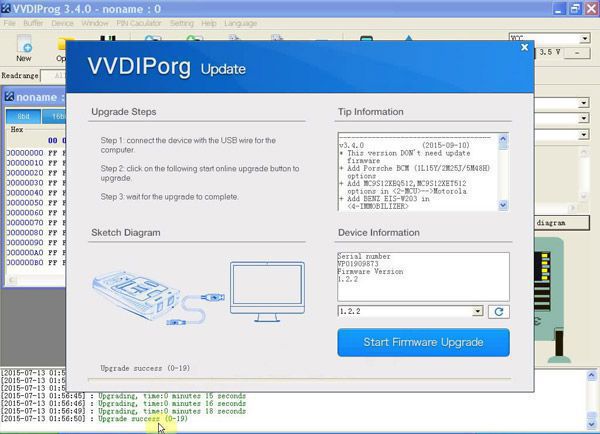
Click the "Upgrade" button to enter the upgrade interface, as shown in the following picture:
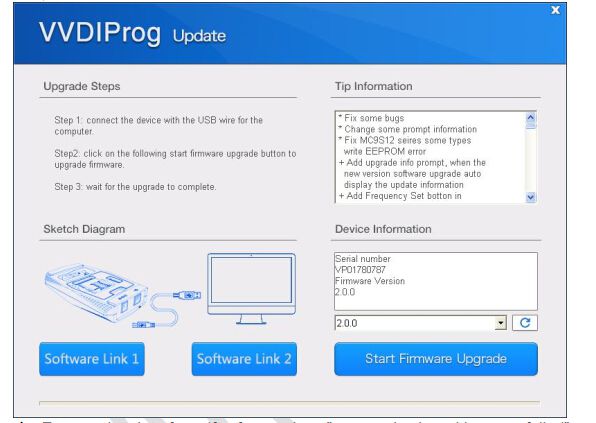
Enter the update interface. If the software shows “communication with server failed,” please close your antivirus and computer firewall and retry. If the software shows “unable to find equipment,” please reconnect the device.
Tip information displays the latest software version and upgrade details.
Device information shows the device SN, device firmware version, and the latest firmware version.
Firmware Upgrade Steps
- Select the firmware version
- Click “Start Firmware Upgrade” button
- Do not close or unplug the USB cable before the upgrade finishes
Software Upgrade Steps
- Click “Software Link 1” or “Software Link 2” button to download software from the web
- Extract the file
VVDI Prog Programmer Supported Type List
Memory
ATMEL, CATALYST, EXEL, FAIRCHILD, INTEL, MICROCHIP, MITSUBISHI, ST, TOSHIBA, XICOR
MCU
RENESAS V850, RENESAS H8X, RENESAS R8C, MOTOROLA MC68HC(9)08, MOTOROLA MC68HC(9)12,
MOTOROLA MC9S08, MOTOROLA MC9S12, NXP PCF79XX, ST ST10F, INFINEON XC2XXX, ATMEL, ATMEGA XXXX,
INFINEON XC164CS, MICROCHIP PIC18F
VVDI Prog Programmer Support Model List
ECU List
BMW E Series, BMW F Series, BOMBARDIER, CHANGAN, DELPHI, MAGNETI, MARELLI, RENAULT, OTHER
IMMOBILIZER List
AUDI, BENZ, BMW, BUCIK, CHEVROLET, STEC, CHRYSLER, FIAT, FORD, GREATWALL, INFINITI, LANDROVER,
JAGUAR, NISSAN, OPEL, PORSCHE, RENAULT, SAICMOTOR, VOLKSWAGEN, ZHONGHUA
DASHBOARD List
BUICK, CHANGAN, CHERY, CHEVROLET, DONGFENG, FAW, FORD, GEELY, GREATWALL, HAFEI, TOYOTA,
HANTENG, HAIMA, HONDA, JAC, JAGUAR, JINBEI, JMC, LUXGEN, NISSAN, SGMW, VOLOVO, ZHONGHUA, ZOTYE
REMOTE List
BMW E Series, BMW F Series
VVDI PROG Connection Examples
VVDI PROG Connection for Maybach
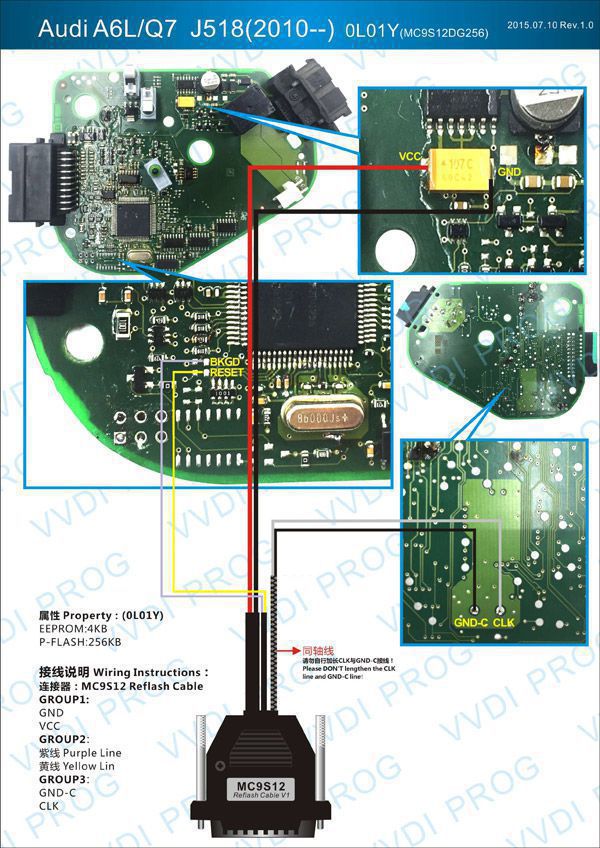
VVDI Prog Connection for Sprinter
VVDI Prog Programmer Unit Description
1. 16 Pin DIP Socket
Function: Read EEPROM chips
Use method: Follow the image direction when inserting the DIP chip (PIN1 as yellow point shown in the picture). SOP chips need to be soldered onto a 16-pin adapter first, then inserted following the image direction.
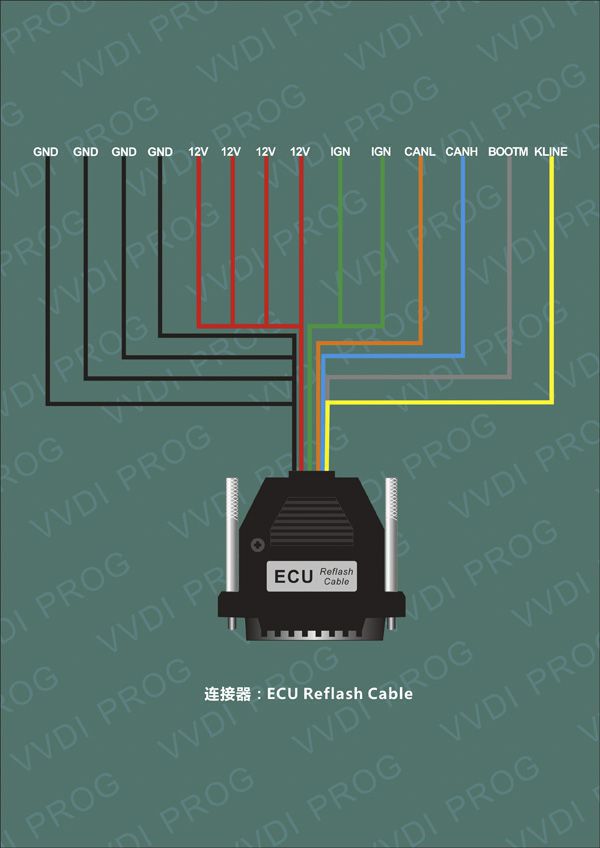
2. MCU Reflash Cable
Function: Read & Write MC68HC(9)12, V850, H8X, R5C series chips (current version is V2)
Use method: Solder the line onto the pin of the chip before read & write
Notes:
(1) Please check all connection lines to ensure correct and reliable connection.
(2) Do not lengthen CLK and GND-C lines, as this may cause read data failure.
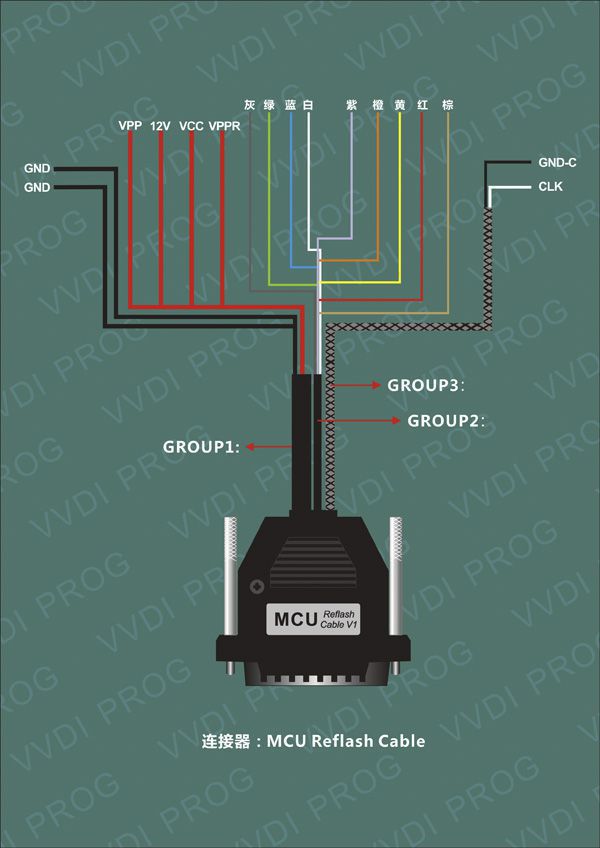
3. ECU Reflash Cable
Function: Read & Write engine ECU
Use method: Connect the ECU and R&W
Notes: Please check all connection lines to ensure correct and reliable connection.
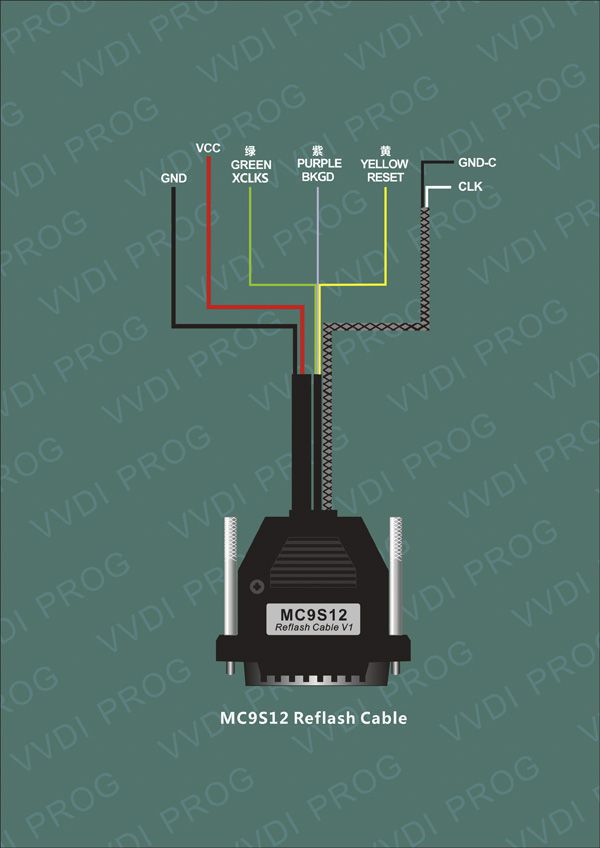
4. MC9S12 Reflash Cable
Function: Read & Write MC9S08, MC9S12 series chips (current version is V1)
Use method: Solder the line onto the pin of the chip before read & write
Notes:
(1) Please check all connection lines to ensure correct and reliable connection.
(2) Do not lengthen CLK and GND-C lines, as this may cause read data failure.
VVDI Prog Programmer Feedback
Did a few tests today and this is what I found out.
It seems that VVDI prog reading speed is dependent on the processor speed of the computer.
CAS3 0L15Y flash read times:
Centrino processor @ 1.6GHz Windows XP = 12 mins
Core2 Duo processor @ 2.5GHz Windows 7 32-bit = 5 mins
i7 @ 4.4GHz Windows 7 64-bit = 2 mins 30 seconds.
Other programmers do not seem to be affected by processor speed at all.
I also would have thought this was a fairly easy question to answer without me doing all the testing.
Tested by me: cas 2, cas 3, cas 3+, Cas4 5m48h, volvo cem v40 all ok.
Is a very good tool and for BMW cas4.
I tested today D80 and a m35080v6, and they work perfect.
Mine erased D160 (BMW F01 dash) with no problem.
Tried to renew BMW E series 868 key. VVDI programmer claimed operation success but in Tango key is now recognized as transponder type A. Locked.
I did renew 2 keys! Both worked and are now programmed to cars!
Only thing you need to disconnect from PCB is battery while writing the renew file. (Remove the batteries)
Renew BMW series E 868 key – 100% OK with VVDI-prog v4.5.7
FRM3 works perfectly
More EDC17 under ECU section would be great!
Especially BMW EDC16 and EDC17 for ISN purposes.
BMW F series FEM module reading—but for that I can only dream about…
BMW BMSX bike ECU would be great…
Renew pcf7946 and 29f family
Renew E series remote with pcf7942 / pcf7944 would be fine
Unlock and download the 9S12G128 secure without erasing it first would be nice.
Erasing all 35080s and D80 with SOIC clip would be super nice too!
I read the CAS3+ MCU with VVDI Prog and that worked perfect.
BMW FRM3 series Exx – READ and WRITE – OK
BMW KEY series Exx – OK
BMW DashBoard 6WB 160DQWT – READ, ERASE, WRITE – OK
VVDI Prog Reviews
2004 Suzuki Jimny
The first job I did with this kit was actually a 2004 Suzuki Jimny, literally within around 30–45 minutes of the parcel being delivered. The software was quick and easy to install (No CD provided; need to download from dealer website and update to latest version).
For the Suzuki, I used the VVDI-prog with the EEPROM clip adapter to read the immobox 24c01 in-circuit. Then using the VVDI2 immobiliser data tool, I was able to create a dealer key with an Xhorse 4d/4c chip. Write the new dump back to the immobox with VVDI-prog, put it all back together—and it worked first time, thankfully, after previous failed attempts with other devices.
End goal complete and happy with the new purchase.
BMW EWS3
I did some testing on the bench with a BMW EWS3 using VVDI2 with the CAS adapter cable (needs external 12Vdc supply). It reads the EWS ok, but can’t write a file back to EWS.
I will try reading the EWS3+ that is in my car and produce a dealer key for it.
The file change km’ seems to read from dump ok, and will allow you to modify file with new km (untested on car though). If I get some time later on, I’ll try read/write with VVDIprog.
VVDI Prog FAQs
Q1:
My VVDIProg fell on the ground—my worker didn’t pay attention. Now I plug into USB; the drivers in Device Manager are good, but it always says “device error—check USB driver.”
I had installed on both laptops—same problem. So I disasseMBled the device and found out that the 3V battery inside was loose (negative terminal). I soldered it again, but it’s the same.
A1:
If the battery was removed, security data is gone. You need to send it in for repair.
There is nothing you can do on your own.
VVDI Prog Programmer Package List
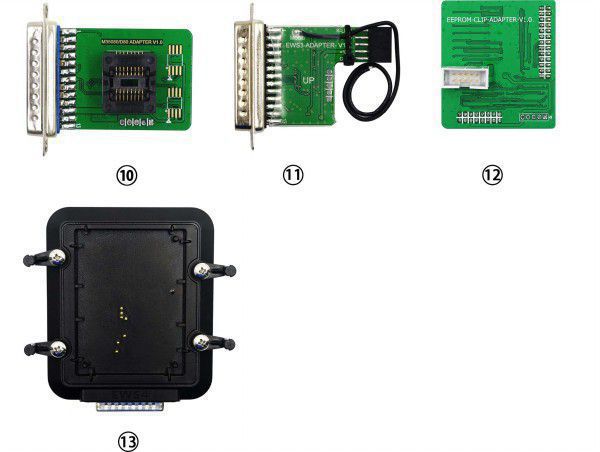
- VVDI Prog device
- EEPROM Socket
- EEPROM Adapter
- MC9S12 Reflash Cable V1
- MCU Reflash Cable
- ECU Reflash Cable
- USB B-Tyte Cable
- TB28FXXX Adapter (Optional)
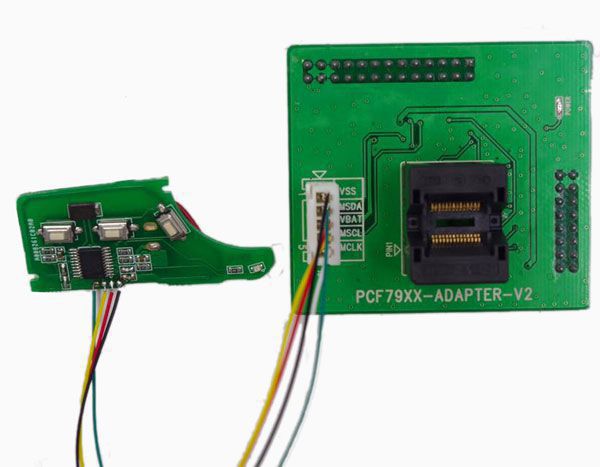
- PCF79XX Adapter (Optional)
- New M35080/D80 Adapter (Optional)
- New EWS3 Adapter (Optional)
- New EEPROM CLIP Adapter (Optional)
- New EWS4 Adapter (Optional)

- Related Items
- Recommond Tools
- Hot Sale
- On Sale
- New Arrivals
- Freeshipping Items
-
 US$999.00 / piece
 -
 US$379.05 / piece
 -
 US$159.00 / piece
 -
 US$55.00 / piece
 -
 US$550.05 / piece
 -
 US$179.00 / piece
-
 US$409.00 / piece
 -
 US$1,398.00 / piece
 -
 US$1,248.71 / piece
 -
 US$479.00 / piece
 -
 US$799.00 / piece
 -
 US$89.90 / piece
-
 US$1.90 / piece
 -
 US$79.90 / piece
 -
 US$629.00 / piece
 -
 US$39.90 / piece
 -
 US$151.05 / piece
 -
 US$499.00 / piece
-
 US$298.00 / piece
 -
 US$43.90 / piece
 -
 US$68.99 / piece
 -
 US$674.50 / piece
 -
US$1,956.05 / piece
-
 US$449.00 / piece
-
![[Basic Auto Version] KT200 ECU Programmer Master Version Support ECU Maintenance Chip Tuning DTC Code Removal OBD/BOOT/BDM/JTAG](/upload/pro/kt200-ecu-programmer-auto-version-200.jpg) US$490.00 / piece
US$490.00 / piece -
 US$10.35 / piece
 -
 US$19.99 / piece
 -
 US$249.00 / piece
 -
 US$259.00 / piece
 -
 US$49.99 / piece
-
 US$21.99 / piece
 -
 US$57.99 / piece
 -
 US$34.99 / piece
 -
 US$399.00 / piece
 -
 US$75.00 / piece
 -
 US$19.99 / piece
Trending Products
 US$464.00 / piece
- US$799.00 / piece
 US$371.00 / piece
- US$1,956.05 / piece
 US$979.00 / piece
- US$1,398.00 / piece